Best Group Email Services Compared (2026)
The best group email services for discussion lists in 2026 are Gaggle Mail, Groups.io, Google Groups, Simplelists, Mail-List.com, GNU Mailman and L-Soft LISTSERV. All give a group one shared address that members can reply to. This comparison covers setup, moderation, archives, custom domains, support and price for a 500-member group. If you want to send one-way newsletters, you need email marketing software instead; see group email vs email marketing.
Last updated: September 2026
At a glance
| Service | Best for | Free tier | Starting price | Key strength |
|---|---|---|---|---|
 Gaggle Mail Gaggle Mail | Small-medium groups wanting simplicity | Free for up to 200 members | $10/mo | Simple setup and reliable delivery |
 Groups.io Groups.io | Large or technical communities | Free for up to 100 members | $20/mo | Deep feature set |
 Google Groups Google Groups | Google Workspace organizations | Free for all Google account holders | Free | Low cost and familiar ecosystem |
 Mailman Mailman | Self-hosted teams | Free if self-hosted | Free software | Full infrastructure control; Mailman 2.1 is end-of-life |
 Mail-List.com Mail-List.com | Hosted lists with support | No | $1.07/member/yr | White-glove setup |
 Simplelists Simplelists | IT teams replacing an in-house list server | No | $13/mo | ISO 27001, SSO and API |
 L-Soft Listserv L-Soft Listserv | Universities and enterprise | No | ~$500+/year | Scale to very large lists |
Prices last checked: October 2026.
Try Gaggle Mail free for 30 days, no credit card, or start a free group of up to 200 members.
Not sure if you need a discussion platform or a newsletter tool? Start with what a mailing list is and what group email means in practice.
Group Email vs Email Marketing: What is the difference?
Group email is for conversations where members can reply to the whole group. Email marketing tools are designed for one-way campaigns and newsletters. If you need discussion, archives, and member-style communication, choose a true group email service. For a full breakdown of the two, read our guide to group email vs email marketing.
What are the options?
The goal here is to stay objective: where a competitor is stronger, we say so. The best service depends on your group size, workflow, and technical comfort.
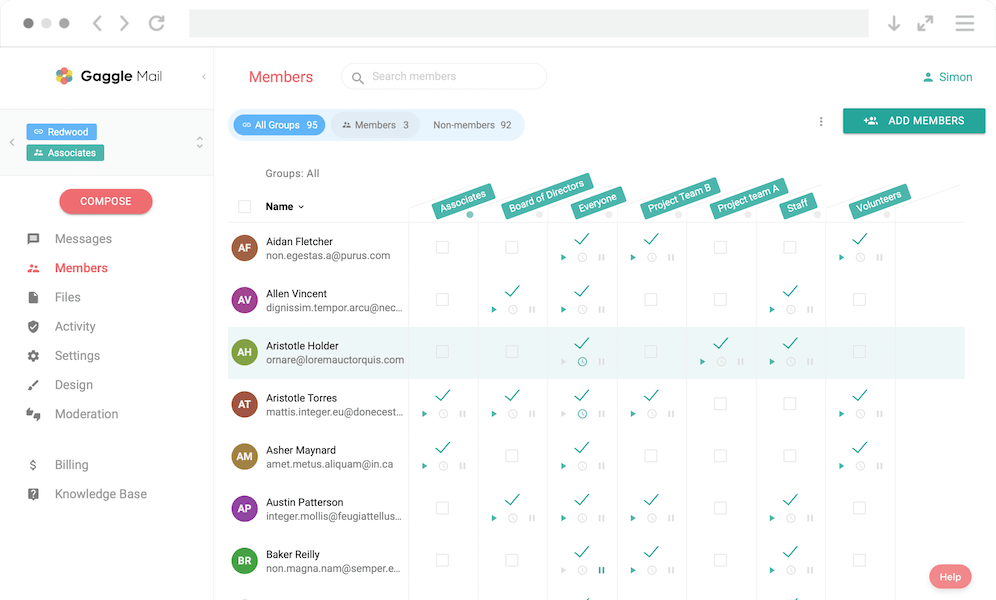
Gaggle Mail is a cloud-hosted group email service built around one idea: it should be simple and reliable to run a mailing list. You pick a group address, add members, and your group can start communicating right away.
Members email the group address and everyone gets the message. There are no user accounts to create and no software to install, so non-technical admins can get up and running quickly. See how Gaggle Mail works for a full walkthrough.
- Free for groups up to 200 members
- Custom domain support with your own group address
- Searchable archives plus moderation and approval workflows
- Daily digest mode for members who prefer fewer emails
- Analytics dashboard with delivery insights and activity trends
- AI summaries, incognito posting, and free migration from major platforms
Very fast setup, strong delivery reliability, clean admin interface, generous free tier, and excellent migration support.
Fewer built-in collaboration extras than Groups.io, such as an integrated wiki, calendar, and file library.
Groups.io is one of the most feature-rich group email services available and a common destination for communities that moved from Yahoo Groups.
It combines traditional email discussion lists with a web collaboration layer, so teams can manage conversations, files, polls, and subgroups in one place.
- Email-based discussions with web archives
- Integrated files, photos, wiki, calendar, and polls
- Subgroups, hashtags, and topic threading
- Public group directory and discoverability options
What do Groups.io reviews say?
Public reviews of Groups.io are broadly positive. Users consistently praise its reliability, the depth of its feature set, and its role as the natural home for communities displaced by the Yahoo Groups shutdown. Long-running hobbyist and technical communities in particular value the subgroups, hashtags, and integrated files and wiki.
The recurring criticisms mirror the limitations above: the interface feels dated and cluttered to newer users, less technical members can struggle with onboarding, and support is primarily email- and community-based rather than hands-on. If your members are mostly non-technical volunteers, that learning curve is the main thing to weigh against its feature depth. If you do decide to move, Gaggle Mail offers free migration from Groups.io.
Best-in-class feature depth for complex, active communities that need more than email.
Interface can feel overwhelming for simple use cases, and costs can increase quickly as groups scale. If that sounds familiar, see our guide to Groups.io alternatives.
Google Groups is Google's built-in group email and discussion tool. For organizations already using Google Workspace, it is often the default option.
It integrates naturally with Gmail and other Google products, but there are practical trade-offs around flexibility, customization, and user experience.
- Email discussion lists with web archive support
- Google Workspace integrations and collaborative inbox options
- Nested group structures for larger organizations
- Free for Google account holders
Free, familiar, and capable of handling large list sizes without additional platform fees.
Less control over branding and member experience, no straightforward custom-domain group address, and weaker analytics than dedicated platforms. For a deeper dive, see Google Groups alternatives.
Mailman is the open-source standard for mailing list management and has been used for decades by universities, open-source communities, and technical organizations.
It offers deep configurability and full infrastructure ownership, but that flexibility comes with operational overhead.
- Full-featured mailing list management and moderation controls
- Highly configurable policy, bounce, and deliverability settings
- Mailman 3 web admin and archive tools (Postorius and HyperKitty)
- Plugin ecosystem and complete data ownership
Maximum control and customization for teams that need to own every part of the stack.
Requires technical expertise for server operations, authentication, and ongoing maintenance. If you would rather not run servers, compare hosted Mailman alternatives or read about migrating from Mailman.
Mail-List.com is a long-running hosted mailing list service focused on hands-on support. Their team helps with setup, migration, and ongoing administration.
For organizations that want a managed experience over a DIY setup, this service is designed to reduce technical burden.
- Fully hosted list management with no software install
- White-glove setup and migration assistance
- Unlimited phone and email support
- Archive access, delivery logs, and custom domain support
Personal support quality is a standout, especially for non-technical teams.
Product experience feels dated and advanced analytics/customization are limited. See our Mail-List.com alternative comparison.
Simplelists is a UK-based hosted list server, used by universities and other large organisations that want to stop running their mailing lists in-house.
It is sold to IT teams: it is ISO 27001 certified, offers SAML2 single sign-on, and has an API for connecting lists to other systems. The trade-off is the member experience, which feels dated next to newer services.
- Searchable archives with threading, password-protectable, at no extra cost
- Daily digest as standard
- Moderation by sender, message size and content, plus bounce handling
- Header, footer and subject prefix customisation, and mail-merge
- Multiple administrators per list, and unlimited lists on your own domain on multi-list plans
- External API, webhooks and Zapier; SAML2 SSO (Entra, Okta, ADFS, Auth0, Ping, Shibboleth) on Enterprise
Mature, ISO 27001 certified list hosting with the controls an IT team expects: SSO, API access, custom domains, and moderation and bounce handling.
No free plan, and the admin interface and member experience feel dated. It has no AI summaries, open rate tracking or incognito posting. Gaggle Mail has a more modern admin interface and member self-service, is free for groups up to 200 members, and migrates your lists for free.
L-Soft Listserv is the original commercial mailing list platform and is still widely trusted by universities, government agencies, and large enterprises. New to the term? Start with what a listserv is.
It is built for institutional scale, compliance-heavy environments, and organizations managing very large subscriber bases.
- Support for very large lists and high-volume operations
- On-premises and hosted deployment choices
- Advanced moderation, archive, and compliance capabilities
- Additional newsletter tooling through Maestro add-ons
Exceptional scale, enterprise pedigree, and long-term institutional track record.
Higher cost and steeper administration complexity for small or mid-sized groups. See also Listserv alternatives.
Feature comparison deep-dive
Setup and usability
| Feature | Gaggle Mail | Groups.io | Google Groups | Mailman | Mail-List.com | Simplelists | Listserv |
|---|---|---|---|---|---|---|---|
| Setup time | Minutes | Minutes | Minutes | Hours-days | They do it for you | Minutes | Hours-days |
| Hosted (no server needed) | ✓ | ✓ | ✓ | ✗ | ✓ | ✓ | Optional |
| Modern admin interface | ✓ | Moderate | Basic | Moderate (v3) | Basic | Basic | Dated |
| Member self-service | ✓ | ✓ | ✓ | ✓ | Limited | ✓ | ✓ |
| Mobile-friendly | ✓ | ✓ | ✓ | Varies | Limited | Limited | ✗ |
Core email features
| Feature | Gaggle Mail | Groups.io | Google Groups | Mailman | Mail-List.com | Simplelists | Listserv |
|---|---|---|---|---|---|---|---|
| Custom domain | ✓ | Enterprise only | ✗ | ✓ | ✓ | Multi-list plans | ✓ |
| Reply-to-list | ✓ | ✓ | ✓ | ✓ | ✓ | ✓ | ✓ |
| Message moderation | ✓ | ✓ | ✓ | ✓ | ✓ | ✓ | ✓ |
| Attachment handling | Yes (25MB free / unlimited paid) | Yes (storage limits) | ✓ | ✓ | Unlimited | Limited | ✓ |
| Bounce management | Automatic | Automatic | Automatic | Configurable | Automatic | ✓ | Configurable |
| Daily digest | ✓ | ✓ | ✓ | ✓ | ✓ | ✓ | ✓ |
| Incognito / anonymous posting | ✓ | ✗ | ✗ | ✗ | ✗ | ✗ | ✗ |
| AI summaries | ✓ | ✗ | ✗ | ✗ | ✗ | ✗ | ✗ |
Archives and search
| Feature | Gaggle Mail | Groups.io | Google Groups | Mailman | Mail-List.com | Simplelists | Listserv |
|---|---|---|---|---|---|---|---|
| Searchable archives | ✓ | ✓ | ✓ | Yes (HyperKitty) | ✓ | ✓ | Yes (add-on cost) |
| Archive privacy controls | ✓ | ✓ | ✓ | ✓ | ✓ | ✓ | ✓ |
| Message threading | ✓ | ✓ | ✓ | ✓ | Limited | ✓ | ✓ |
Administration and analytics
| Feature | Gaggle Mail | Groups.io | Google Groups | Mailman | Mail-List.com | Simplelists | Listserv |
|---|---|---|---|---|---|---|---|
| Member import / export | ✓ | ✓ | ✓ | ✓ | ✓ | ✓ | ✓ |
| Role-based permissions | ✓ | ✓ | ✓ | ✓ | Limited | Multiple admins per list | ✓ |
| Usage analytics | Yes (detailed) | Basic | Basic | ✗ | Delivery logs | ✗ | Basic |
| Open rate tracking | Yes (Premium) | ✗ | ✗ | ✗ | ✗ | ✗ | Yes (Maestro add-on) |
| Activity heatmaps | ✓ | ✗ | ✗ | ✗ | ✗ | ✗ | ✗ |
| API access | Yes (Standard+) | ✓ | ✓ | ✓ | ✗ | Yes (API, webhooks, Zapier) | ✓ |
| SSO / Single Sign-On | Yes (Premium) | Enterprise | Via Google | ✗ | ✗ | Enterprise (SAML2) | ✗ |
Pricing overview
| Gaggle Mail | Groups.io | Google Groups | Mailman | Mail-List.com | Simplelists | Listserv | |
|---|---|---|---|---|---|---|---|
| Free tier | Up to 200 members | Up to 100 members | Unlimited | Free (self-hosted) | 30-day trial | No | Listserv Lite |
| 100 members / month | Free | Free | Free | Free* | $107–$347/yr | From $13 | ~$500+/yr |
| 500 members / month | ~$50 | $20 | Free | Free* | $535–$1,735/yr | $27 | ~$500+/yr |
| 1,000 members / month | ~$100 | $40 | Free | Free* | $1,070–$3,470/yr | $27 | ~$500+/yr |
| Ad-free | ✓ | ✓ | ✗ | ✓ | ✓ | ✓ | ✓ |
*Mailman is free software, but you pay for hosting, maintenance, and your own time.
Prices last checked: October 2026.
Migrating from Yahoo Groups?
Yahoo Groups closed in December 2020, and most of the communities that ran on it moved in a hurry to Groups.io or Google Groups. Five years on, many of them are looking again: the free tiers shrank, the interfaces did not improve, and the volunteer who did the first move has often handed over to someone new.
Every service in this comparison imports a member list from a CSV file, so the second move is easier than the first. If you landed on Groups.io, see how to migrate from Groups.io; if you chose Google Groups, the Google Groups migration tool brings members, archive and settings across from a Google Takeout export in under an hour.
Conclusion
How to choose the right service
If you only remember one thing from this comparison, make it this: choose the simplest tool that still fits your group's real workflow today, then scale up only if you need to.
Want the simplest, most reliable option? Start with Gaggle Mail and get live quickly.
Need wiki, files, and polls? Pick Groups.io for deeper collaboration tooling.
Already all-in on Google Workspace? Google Groups can be a workable low-cost baseline.
Need full infrastructure control? Mailman is the open-source standard for self-hosting.
Running very large institutional lists? Listserv remains a strong enterprise option.
Sending newsletters, not discussions? You may want an email marketing tool instead — see group email vs email marketing.
Choosing for a specific kind of organization? See how group email works for churches, nonprofits, schools and education, HOAs, associations, bar associations, and healthcare networks.
Related guides
- Group email software: what it does and what it costs
- Google Groups alternatives
- Listserv alternatives
- Listserv hosting for lists your university is retiring
- GNU Mailman 2 end-of-life
- What is group email?
- What is a listserv?
- Email list management for groups
- Group email vs email marketing
- Group analytics features
- Wild Apricot integration
- Group email for bar associations
- Group email for healthcare networks
- Pricing and plans
- How Gaggle Mail works
Frequently asked questions
Ready to switch your group email service? Get started for free today.
Completely free for groups of up to 200 members. All paid plans have 30-day free trial, no credit card required.
Get Started